

Introduction
In this section, we will discover:
The purpose of stucturing projects.
Each entity of a project structure:
 Program.
 Project.
 Step.
Step. Study.
 Experiment.
 Test.
Test.
The user guide to manage your project:
How to create a program.
How to create a project.
The common functions of the project hierarchy.
Special functions offered in order to maximise your experience.
Definition
The key to efficient research is to use knowledge, a quality-based system, and continuous improvement. With its deeply minded project structuration, Laby offers the easiest way to:
Organize a project.
Structure and retrieve information following the ALCOA++ principles.
Speed up new team member integration.
Improve learning curve.
Anticipate resources needs.
Distribute information for actuals vs budget and forecast comparison.
and more.
Laby contextualizes all the project-related information you consult! Through a single view and in a second, you can understand:
The way the project has been developed.
The finalized steps (milestones, work packages, etc.).
The ongoing activities.
The planned studies.
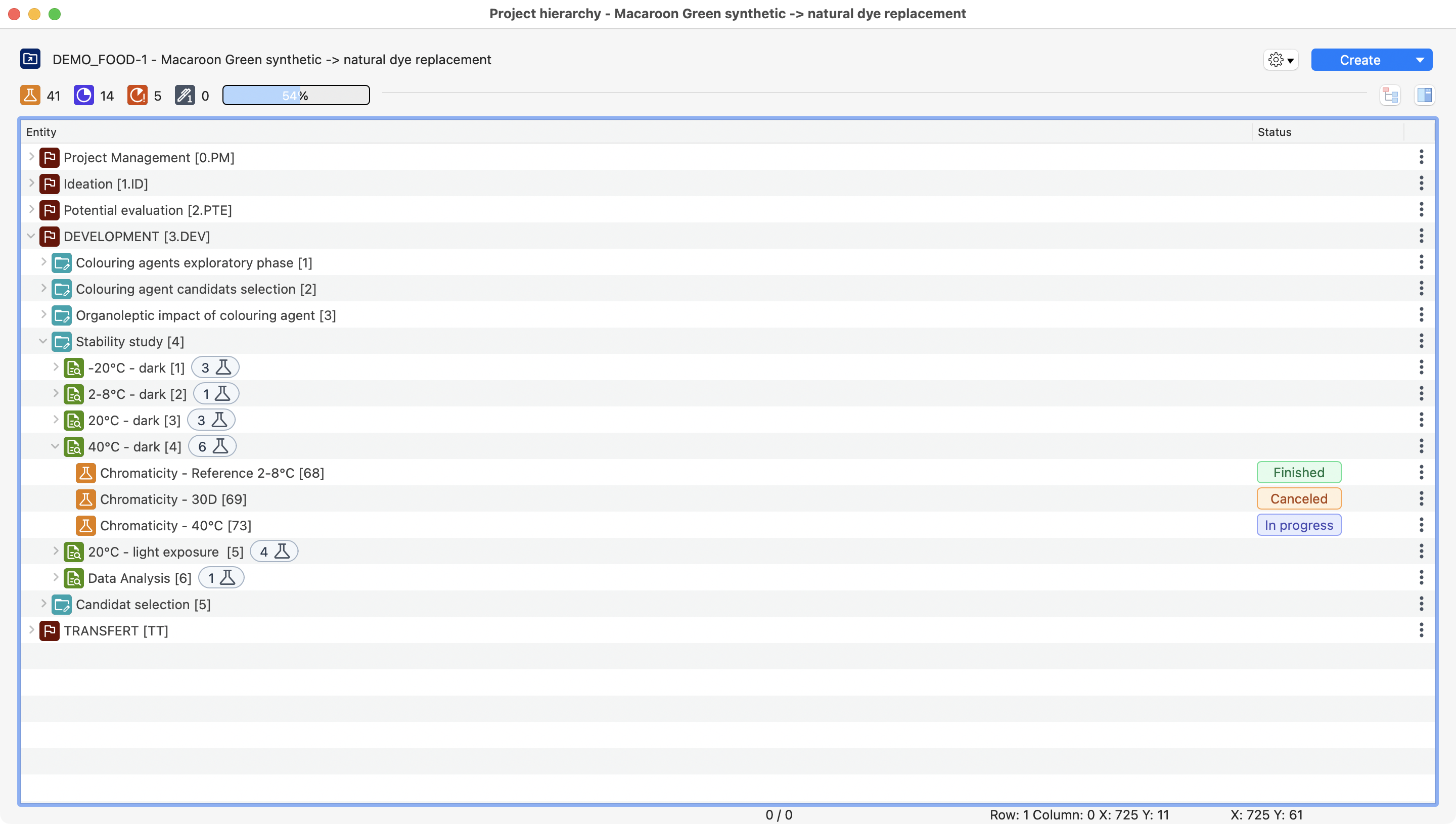
View of a project inside Laby. With steps, experiments, tests, and all its information.
Here is a short description of each level of the hierarchy and its purpose:
Entity |
Logo |
Description |
Example 1 |
Example 2 |
Example 3 |
|---|---|---|---|---|---|
Program |
|
Collection of projects managed to reach a strategic goal. May regroup projects around a specific research area, partner, or business focus. |
“Neuroscience Research” |
“Polymer Chemistry Development” |
“Antibody Drug Conjugate Development” |
Project |
|
Groups all activities for specific projects. Usually defined by a target product profile or attached to a contract and budget. |
“Alzheimer’s Drug Development” |
“Novel Coating Materials Project” |
“ADC Manufacturing” |
Step |
|
Groups activities for a project milestone or phase. Marks a major development stage, may lead to Go/No-Go decisions, or represents a work package. |
“Pre-Clinical Testing” |
“Synthesis Optimization Phase” |
“DSP Phase” |
Study |
|
Addresses a specific research question. Develops methods for validation, calibration curves, or product assessment criteria. |
“API Solubility Analysis” |
“Thermal Decomposition Analysis” |
“Purification Method Validation” |
Experiment |
|
Set of tests to validate or refute a hypothesis. Shows cause-and-effect relationships and what happens when factors change. |
“Solubility in Different Solutions” |
“Reaction Temperature Variation Study” |
“Column Chromatography Optimization” |
Test |
|
Lowest hierarchy level. Collects analysis results with experimenter, protocol, date, and raw materials. Centralizes raw data, videos, photos, and related files. |
“Solubility in Saline Solution” |
“Thermal Stability Test at 80°C” |
“Protein A Affinity Column Run 001” |


Note
The step level has a special role in access rights.
A specific right access can be set between a step type and a user.
Thanks to that, a user can have by default transversal access to a step type in all projects as soon as this step is created, without necessarily having access to the whole project.
This is particularly useful for users with specific expertise.